全网VIP影视自由!Python神器源码
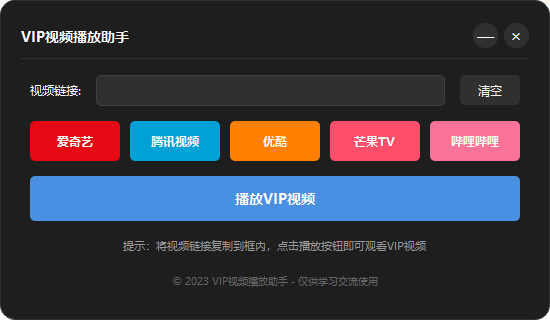
厌倦了各大平台VIP层层收费?
拒绝重复充值 拒绝平台限制
import sys
import webbrowser
from PyQt5.QtWidgets import (QApplication, QMainWindow, QWidget, QVBoxLayout, QHBoxLayout,
                            QLabel, QLineEdit, QPushButton, QFrame, QMessageBox)
from PyQt5.QtCore import Qt, QPropertyAnimation, QRect, QEasingCurve, pyqtSignal, QPoint
from PyQt5.QtGui import QFont, QIcon, QColor, QPalette, QPainter, QBrush, QPen, QLinearGradient

class ModernWindow(QMainWindow):
    """自定义现代窗口"""
    def __init__(self, parent=None):
        super().__init__(parent)
        self.setWindowFlags(Qt.FramelessWindowHint)
        self.setAttribute(Qt.WA_TranslucentBackground)
        self.dragPosition = QPoint()

        # 设置窗口大小和标题
        self.resize(550, 320)
        self.setWindowTitle("VIP视频播放助手")

        # 创建中心部件和布局
        self.central_widget = QWidget()
        self.setCentralWidget(self.central_widget)
        self.main_layout = QVBoxLayout(self.central_widget)
        self.main_layout.setContentsMargins(0, 0, 0, 0)

        # 创建主框架
        self.main_frame = QFrame()
        self.main_frame.setObjectName("main_frame")
        self.main_frame.setStyleSheet("""
            #main_frame {
                background-color: #1E1E1E;
                border-radius: 15px;
                border: 1px solid #303030;
            }
        """)
        self.main_layout.addWidget(self.main_frame)

        # 创建内容布局
        self.content_layout = QVBoxLayout(self.main_frame)
        self.content_layout.setContentsMargins(20, 20, 20, 20)

        # 创建标题栏
        self.title_bar = QWidget()
        self.title_bar.setFixedHeight(30)
        self.title_layout = QHBoxLayout(self.title_bar)
        self.title_layout.setContentsMargins(0, 0, 0, 0)

        # 标题标签
        self.title_label = QLabel("VIP视频播放助手")
        self.title_label.setStyleSheet("color: #FFFFFF; font-size: 14px; font-weight: bold;")
        self.title_layout.addWidget(self.title_label, alignment=Qt.AlignLeft)

        # 窗口控制按钮
        self.minimize_button = QPushButton("—")
        self.minimize_button.setFixedSize(25, 25)
        self.minimize_button.setStyleSheet("""
            QPushButton {
                background-color: #303030;
                color: #FFFFFF;
                border-radius: 12px;
                font-size: 16px;
            }
            QPushButton:hover {
                background-color: #4A90E2;
            }
        """)
        self.minimize_button.clicked.connect(self.showMinimized)

        self.close_button = QPushButton("×")
        self.close_button.setFixedSize(25, 25)
        self.close_button.setStyleSheet("""
            QPushButton {
                background-color: #303030;
                color: #FFFFFF;
                border-radius: 12px;
                font-size: 16px;
            }
            QPushButton:hover {
                background-color: #E53935;
            }
        """)
        self.close_button.clicked.connect(self.close)

        self.title_layout.addWidget(self.minimize_button)
        self.title_layout.addWidget(self.close_button)

        self.content_layout.addWidget(self.title_bar)

        # 添加分隔线
        self.separator = QFrame()
        self.separator.setFrameShape(QFrame.HLine)
        self.separator.setStyleSheet("color: #303030;")
        self.content_layout.addWidget(self.separator)

        # 创建应用内容区域
        self.app_content = QWidget()
        self.content_layout.addWidget(self.app_content, 1)

        # 创建内容布局
        self.app_layout = QVBoxLayout(self.app_content)
        self.app_layout.setSpacing(15)

        # 视频链接输入区域
        self.link_layout = QHBoxLayout()

        self.link_label = QLabel("视频链接:")
        self.link_label.setStyleSheet("color: #FFFFFF; font-size: 12px;")
        self.link_layout.addWidget(self.link_label)

        self.link_input = QLineEdit()
        self.link_input.setStyleSheet("""
            QLineEdit {
                background-color: #303030;
                color: #FFFFFF;
                border: 1px solid #404040;
                border-radius: 5px;
                padding: 5px;
                font-size: 12px;
            }
            QLineEdit:focus {
                border: 1px solid #4A90E2;
            }
        """)
        self.link_layout.addWidget(self.link_input, 1)

        self.clear_button = QPushButton("清空")
        self.clear_button.setFixedSize(60, 30)
        self.clear_button.setStyleSheet("""
            QPushButton {
                background-color: #303030;
                color: #FFFFFF;
                border-radius: 5px;
                font-size: 12px;
            }
            QPushButton:hover {
                background-color: #4A90E2;
            }
        """)
        self.clear_button.clicked.connect(self.clear_input)
        self.link_layout.addWidget(self.clear_button)

        self.app_layout.addLayout(self.link_layout)

        # 平台按钮区域
        self.platforms = [
            {"name": "爱奇艺", "url": "https://www.iqiyi.com", "color": "#E50914"},
            {"name": "腾讯视频", "url": "https://v.qq.com", "color": "#00A1D6"},
            {"name": "优酷", "url": "https://www.youku.com", "color": "#FF7F00"},
            {"name": "芒果TV", "url": "https://www.mgtv.com", "color": "#FF4E6A"},
            {"name": "哔哩哔哩", "url": "https://www.bilibili.com", "color": "#FB7299"}
        ]

        self.platform_layout = QHBoxLayout()
        self.platform_layout.setSpacing(10)

        for platform in self.platforms:
            btn = QPushButton(platform["name"])
            btn.setFixedHeight(40)
            btn.setStyleSheet(f"""
                QPushButton {{
                    background-color: {platform["color"]};
                    color: #FFFFFF;
                    border-radius: 5px;
                    font-size: 12px;
                    font-weight: bold;
                }}
                QPushButton:hover {{
                    background-color: {self.lighter_color(platform["color"], 0.8)};
                }}
            """)
            btn.clicked.connect(lambda checked, url=platform["url"]: self.open_url(url))
            self.platform_layout.addWidget(btn)

        self.app_layout.addLayout(self.platform_layout)

        # 播放按钮
        self.play_button = QPushButton("播放VIP视频")
        self.play_button.setFixedHeight(45)
        self.play_button.setStyleSheet("""
            QPushButton {
                background-color: #4A90E2;
                color: #FFFFFF;
                border-radius: 5px;
                font-size: 14px;
                font-weight: bold;
            }
            QPushButton:hover {
                background-color: #5CA1F3;
            }
            QPushButton:pressed {
                background-color: #3A80D2;
            }
        """)
        self.play_button.clicked.connect(self.play_video)
        self.app_layout.addWidget(self.play_button)

        # 提示信息
        self.tip_label = QLabel("提示:将视频链接复制到框内,点击播放按钮即可观看VIP视频")
        self.tip_label.setStyleSheet("color: #999999; font-size: 11px;")
        self.tip_label.setAlignment(Qt.AlignCenter)
        self.app_layout.addWidget(self.tip_label)

        # 版权信息
        self.copyright_label = QLabel("© 2023 VIP视频播放助手 - 仅供学习交流使用")
        self.copyright_label.setStyleSheet("color: #666666; font-size: 10px;")
        self.copyright_label.setAlignment(Qt.AlignCenter)
        self.app_layout.addWidget(self.copyright_label)

        # 添加动画效果
        self.animation = QPropertyAnimation(self, b"geometry")
        self.animation.setDuration(300)
        self.animation.setEasingCurve(QEasingCurve.InOutQuad)

    def mousePressEvent(self, event):
        """鼠标按下事件处理"""
        if event.button() == Qt.LeftButton:
            self.dragPosition = event.globalPos() - self.frameGeometry().topLeft()
            event.accept()

    def mouseMoveEvent(self, event):
        """鼠标移动事件处理"""
        if event.buttons() & Qt.LeftButton:
            self.move(event.globalPos() - self.dragPosition)
            event.accept()

    def lighter_color(self, color_hex, factor):
        """使颜色变亮"""
        color = QColor(color_hex)
        h, s, v, a = color.getHsv()
        v = min(255, int(v * factor))
        return QColor.fromHsv(h, s, v).name()

    def open_url(self, url):
        """打开网页链接"""
        webbrowser.open(url)

    def clear_input(self):
        """清空输入框"""
        self.link_input.clear()

    def play_video(self):
        """播放视频"""
        video_url = self.link_input.text().strip()
        if not video_url:
            QMessageBox.warning(self, "提示", "请输入视频链接")
            return

        # 播放地址前缀
        play_prefix = 'https://jx.xmflv.cc/?url='
        webbrowser.open(play_prefix + video_url)

    def showEvent(self, event):
        """窗口显示事件"""
        super().showEvent(event)
        # 窗口出现动画
        start_rect = QRect(self.x(), self.y() + 20, self.width(), self.height())
        end_rect = QRect(self.x(), self.y(), self.width(), self.height())

        self.animation.setStartValue(start_rect)
        self.animation.setEndValue(end_rect)
        self.animation.start()

if __name__ == "__main__":
    # 确保中文显示正常
    font = QFont("Microsoft YaHei")

    app = QApplication(sys.argv)
    app.setFont(font)
    app.setStyle("Fusion")

    # 设置全局样式
    palette = QPalette()
    palette.setColor(QPalette.Window, QColor(30, 30, 30))
    palette.setColor(QPalette.WindowText, Qt.white)
    palette.setColor(QPalette.Base, QColor(25, 25, 25))
    palette.setColor(QPalette.AlternateBase, QColor(53, 53, 53))
    palette.setColor(QPalette.ToolTipBase, Qt.white)
    palette.setColor(QPalette.ToolTipText, Qt.white)
    palette.setColor(QPalette.Text, Qt.white)
    palette.setColor(QPalette.Button, QColor(53, 53, 53))
    palette.setColor(QPalette.ButtonText, Qt.white)
    palette.setColor(QPalette.BrightText, Qt.red)
    palette.setColor(QPalette.Link, QColor(42, 130, 218))
    palette.setColor(QPalette.Highlight, QColor(42, 130, 218))
    palette.setColor(QPalette.HighlightedText, Qt.black)
    app.setPalette(palette)

    window = ModernWindow()
    window.show()

    sys.exit(app.exec_())
只提供源码,如何需要使用,自行编译即可。
转载请说明出处,本文来自[original]
老黑源码 » 全网VIP影视自由!Python神器源码
老黑源码 » 全网VIP影视自由!Python神器源码